
CREATING SOMETHING SPECTACULAR: HOW COMPONENTS BUILT THE HOME OF GOLF APP
Developing a mobile app for St Andrews Links golfers to enhance their experience.

Every app may look different on the surface, but at their core, most share the same essential building blocks: navigation, splash screens, data retrieval, and more. This is by design—even for apps with vastly different purposes, we want the experience to be intuitive for users, enabling successful engagement through familiar navigation and interaction patterns. This concept is what drives Shockoe’s components system. By leveraging an existing, ready-made store of these essential building blocks, we spend less time developing the framework of the application and more time designing and developing the features that make that application unique.
A SMART FOUNDATION FOR SMART DEVELOPMENT
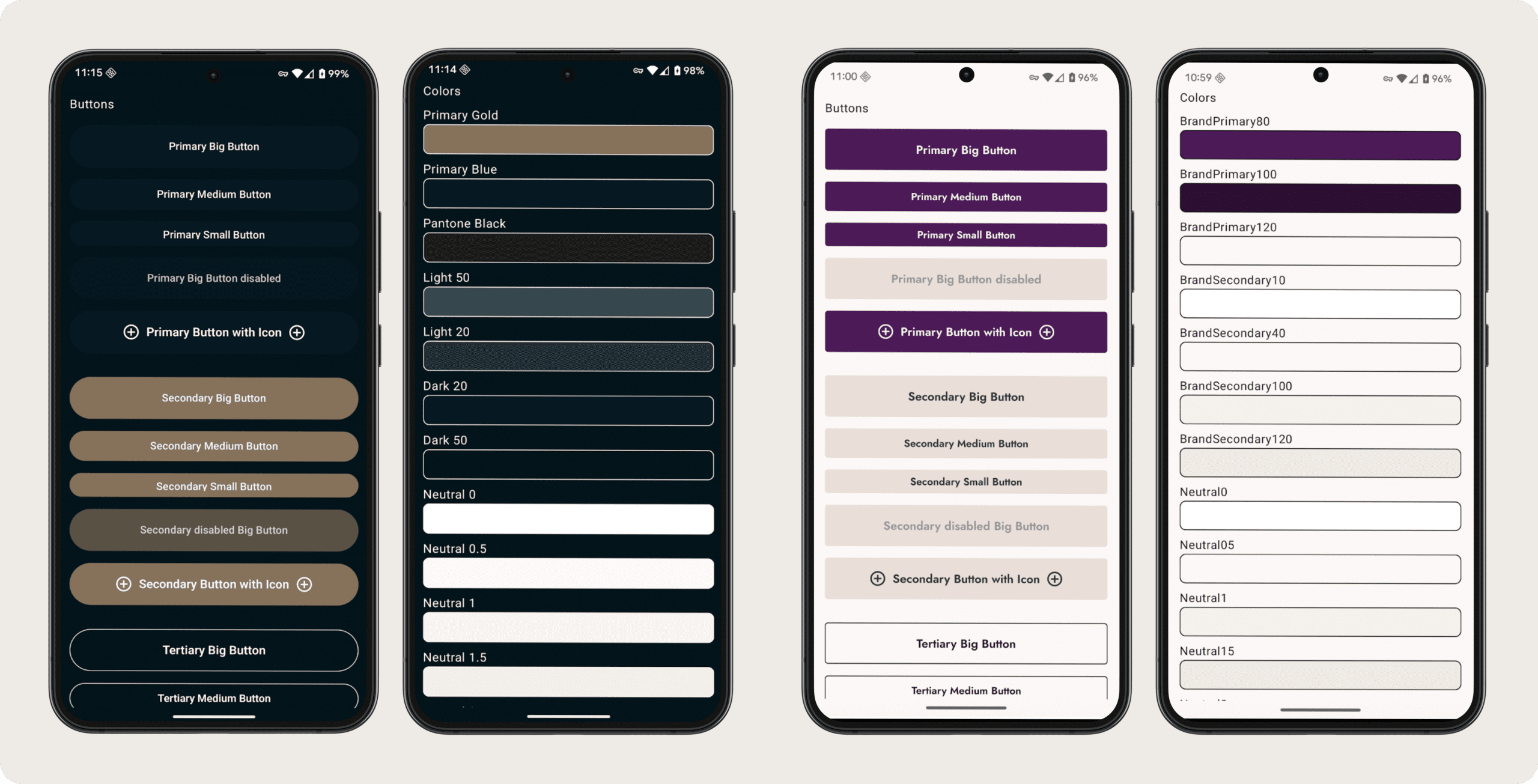
A fundamental piece of the Shockoe component system is a “Kitchen Sink page” (shown below) that outlines the basic building blocks of the application, from text input and dropdowns, to fonts and colors. This is a pre-built module that starts off with basic treatments of each of these elements. At the outset of the Home of Golf project, we applied custom styling to the page to align with St Andrews’ brand. This accomplished two things:
- It allowed us to define these design elements once and then use them throughout the app without repeating ourselves.
- It provided a central location to update branding if there were ever a need to do so.
In fact, for the Home of Golf project, the need to quickly update the app’s colors, fonts, and design element treatments arose a few months into the project, as St Andrews Links was in the middle of updating their digital brand. Our central component system made this a simple matter of changing these elements in one place and having it propagate throughout the rest of the app:
COMPONENT LIBRARIES: A COLLECTION OF FUNDAMENTAL BUILDING BLOCKS
In addition to the UI library, there are other important libraries that make up the Shockoe component system. These libraries live in our repositories and are deployed as-needed across various projects. They generally fall into two categories:
- Utilities for Common Functionality: Our most-used utilities include those for creating network requests and logging analytics events. Why recreate the wheel when these are core capabilities on every project?
- Standalone Features: Frequent modules include those for login, registration, and onboarding, which we can easily adapt to match branding and user requirements. It’s important to note that the UI elements within these modules are the same ones that make up our Kitchen Sink—otherwise, our smart development wouldn’t be very smart.
With these basic building blocks already in place, Shockoe could showcase impressive design and technology experience where it really mattered. See: Digital Course Guides

A REUSABLE AND REPEATABLE FRAMEWORK
The best part about our component system is that it’s constantly evolving. As we develop new building blocks across projects, we add them to a central repository where they can be dropped into other projects and modified as needed to fit relevant brand and business guidelines.
Unlock your AI ADVANTAGE
Our AI Success Roadmap includes our 4 Success Pillars, with custom next steps for continuing your AI journey.
